1. Log into your cPanel account.
2. In the Databases section, click on MySQL Databases icon.

3. Then, in the New Database field, enter a name for the new database you want to create.
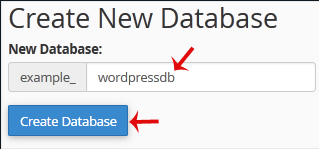
4. Lastly, click on Create Database.


1. Log into your cPanel account.
2. In the Databases section, click on MySQL Databases icon.
3. Then, in the New Database field, enter a name for the new database you want to create.
4. Lastly, click on Create Database.
Powered by WHMCompleteSolution